Calculating MRR from your Stripe data
Deciding what counts, normalizing what does, and being able to say why the number is right.
Published
·
Updated
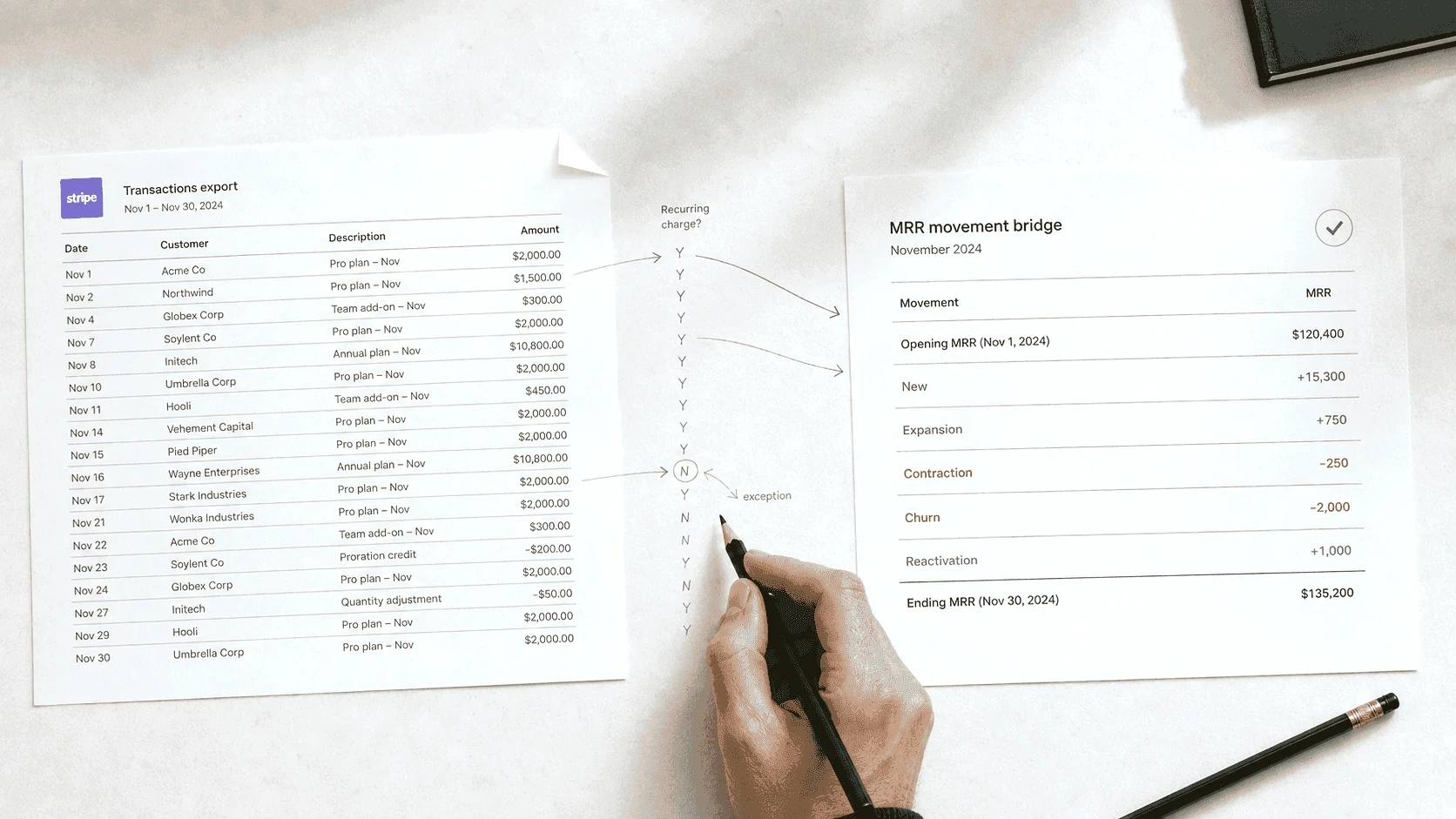
To calculate MRR from Stripe, export invoice line items with their service periods, drop every line without a recurring price, divide each recurring line by the number of months it covers, and add up each month. Before anyone plans against the number, check that the month’s movements add up to the change in the total.
Most guides on calculating MRR start from a clean table that no Stripe account has ever produced. The real starting point is an export full of things that are not recurring revenue: one-off charges, refunds, test-mode rows, the same invoice represented twice. The real work is deciding what counts, converting what counts to a monthly value, and being able to explain both decisions later. This guide walks that path in order: which export to pull, what to exclude, how to normalize, and how to check the result before anyone plans against it.
If you have not exported yet, start with the export guide and come back with a file.
What you are actually computing
MRR is the monthly value of your active recurring relationships. Three words in that sentence carry all the rules. Monthly: contracts billed on any other cycle get converted to a per-month value. Recurring: one-time charges, setup fees and manual invoices for odd jobs are excluded, no matter how large. Active: a subscription that has ended contributes nothing, even if its last payment landed this month.
The consequence people resist: MRR is not what Stripe collected this month. A customer who prepaid a year contributes one-twelfth of that payment to each of twelve months, not everything to January. A customer whose card failed but whose subscription is still active still counts. Collections are a real and separate question (see the section on cash below), but if you plan against collections labeled as MRR, every annual prepay makes you look like you grew and then shrank.
For the surrounding metric definitions (ARR, the movement types, retention), see the metrics guide. This page stays on the one computation.
Stripe already shows you an MRR number
Before computing anything, the fair question: Stripe Billing reports MRR on its own overview, split into new, expansion, contraction and churn. If that number is all you need, use it and stop reading.
It is worth knowing what sits behind it. Stripe exposes a configuration panel that controls how MRR, churn and active subscribers are calculated, including whether recurring discounts are subtracted. Stripe describes subtracting them as the more conservative choice, which tells you the other setting exists and that someone chose one. Prorations and annual plans are handled by convention too. None of those conventions are wrong, but they are decisions, and most teams reading the number have never seen the panel. Stripe also documents that its queryable billing table is fresher than the source behind the overview, so the two can disagree on the current day.
So the dashboard answers one question well: what is the run-rate right now. This guide answers a different one, and the difference is the whole reason to do the work by hand. The question is what MRR was in each of the last twenty-four months, on conventions you chose and wrote down, with every movement traceable to the rows that produced it. That is the number that survives someone asking why March disagrees with the board deck, and it is not a number a dashboard can hand you, because the dashboard has no memory of the conventions it used.
Most published methods answer the run-rate question by summing active subscriptions, and for the run-rate that is the right approach. It cannot produce a series, because a subscription record tells you what is true now, not what was true in April. That is the fork this guide takes.
Which Stripe export can answer the question
Stripe will hand you several files, and they are not interchangeable.
Payments (charges) is the wrong source. It records money moving, with each row stamped on the day it moved. It cannot tell you what period a payment covered, and it records nothing at all for the failed renewal whose subscription is still active. Use it for cash questions.
Subscriptions is right for today and cannot give you a series. A subscriptions export is a snapshot of current state: plan, quantity, status. For the run-rate right now it is the best source there is, which is why most published methods use it. What it cannot do is tell you what was true in April, because it records what is true today and overwrites the rest. It also misses mid-month changes that already resolved. If you only ever need one number for one date, take this route.
Invoices, with line items, is the source. An invoice line item carries two of the three things the computation needs: an amount, and a period (the start and end dates the line covers). For subscription lines that period is the subscription period, which is what lets you place revenue in the months it was earned rather than the month it was billed.
The third thing, the customer, is not on the line. A line item carries the invoice it belongs to, and the invoice carries the customer, so every line-item export needs one join before you can total anything per customer. Worth knowing before you go looking for a column that is not there.
One-off invoice items are different again: their period is either the moment the item was created or a period set on the item, so you cannot assume a one-off line describes a span of service. They are excluded below anyway, but do not use a missing period as the test for whether a line is recurring. Test for a recurring price behind it instead.
If your file has one row per invoice and no period columns, you have the invoice summary. The line items and their periods come through the API or Sigma routes. Without periods you will be guessing at normalization, and the guesses are exactly where MRR arguments start.
Normalizing every line to a monthly value
The rule is one sentence: divide each recurring line's amount by the number of months its period covers, and credit that amount to each covered month.
A $1,200 annual line covering January through December contributes $100 to each of the twelve months. A $300 quarterly line contributes $100 to each of three. A monthly line passes through unchanged. After this step, every customer-month has a comparable number, and stacking them gives you an MRR series rather than a billing series.
First, though: the amounts are not in dollars. Stripe returns amounts in the smallest currency unit, so a $1,200 line arrives as 120000. In a zero-decimal currency such as JPY it arrives as the whole number. Divide by 100 for USD-style currencies before anything else, or every figure in your model is a hundred times too large and the mistake is large enough that nobody catches it by eye.
Two decisions to make once, write down, and never revisit case by case:
Partial periods. A line covering January 15 to February 14 is one month of service that straddles two calendar months. Pick a convention (crediting the month the period starts in is the simplest) and apply it to every line. Consistency matters far more than which one you pick.
Quantity and discounts. Two fields look like the price and only one is the one you want:
amountis the line after discounts,subtotalis before any discounts or taxes. Useamount. A 50% coupon is real, and MRR built onsubtotaloverstates the business by the size of your discounting.
What you never do is spread by payment date. The moment a payment date stands in for a service period, annual customers distort every month they renew in.
What quietly corrupts the number
Every one of these appears in real exports, and each one moves the number in a way that is invisible until someone asks why two reports disagree.
Prorations, which the rule above will mangle. When a customer upgrades or downgrades mid-cycle, Stripe writes proration lines: a credit for the unused part of the old price and a charge for the rest of the period at the new one. Their period is not a billing cycle. It starts when the proration was calculated and ends at the subscription's period end, so it is a stub of arbitrary length carrying a partial amount. Divide a stub by the months it covers and you credit a fragment of a one-off adjustment to a month as though it were run-rate, which quietly moves the number every time anyone changes plan. Prorations are flagged on the line (
prorationon the line's parent details, withproration_detailsbeside it, anddiscountableis always false on them), so they are easy to separate once you know to look. Exclude them from the monthly value and read the plan change from the subscription's new recurring amount instead: that is the expansion or contraction you actually want to report. This is the most common way a hand-built MRR number drifts, because nothing about the export looks wrong.Refunds and credit notes. A refunded charge can appear alongside a credit note for the same money. Subtract it once, not twice: pick one representation and ignore the other. Whether a refund reduces MRR at all depends on what it was: a service credit on an active subscription is not churn; a refund on cancellation is.
One-off invoices. Manual invoices and one-time line items sit in the same export as subscription lines. Anything without a recurring price behind it is excluded from MRR. It is real revenue; it is just not this metric.
The wrong mode. Stripe separates live data from test data completely, and an export contains whichever mode it was pulled from. A test-mode file looks plausible and contains nothing real. Check the mode before anything else; API rows carry a livemode flag for the same check.
Duplicate and merged customers. The same company behind two customer IDs turns one renewal into churn-plus-new. Deduplicate by email or name before computing movements, or accept that customer-level movement will be noisy.
Zero-amount lines. Trials, 100% coupons and placeholder invoices produce $0 lines. They are fine in the file and poison averages: a customer at $0 is not a paying customer yet.
Too little history. A short export window makes the first month look like a wave of new customers and hides everyone coming back after a gap, because nothing before the window exists. Pull at least one full billing cycle before the first month you report, a full year if you sell annual plans, and treat the earliest month as the opening balance rather than as growth.
The honest summary: excluding things is most of the work. The arithmetic is a division.
From clean lines to a monthly series
With recurring lines normalized and the corruptions handled, the series is three grouping steps, workable in a spreadsheet at small scale:
Customer-month totals. Sum normalized amounts per customer per covered month. This table is the foundation for everything after.
The MRR series. Sum each month's column. This is the headline number.
Movements. Compare each customer's total month over month: present now and absent last month is new; higher is expansion; lower is contraction; absent now and present last month is churn; back after an absence is reactivation.
A worked miniature with fabricated numbers. Three customers in March: A at $500 monthly, B at $1,200 billed annually in January (so $100 to March), C at $200 monthly. March MRR is $800. In April, A upgrades to $700, B is unchanged, C cancels. April MRR is still $800, and that flat headline is hiding $200 of expansion and $200 of churn. The identity to keep: starting MRR + new + expansion + reactivation - contraction - churn = ending MRR, exactly. If the movements do not sum to the ending number, something was counted twice or missed. That check is the entire reason to compute movements at all, and why a flat month is never the same as a quiet one.
Cash collected is a different number, on purpose
Run the payments export through a month-by-month sum and you get collections: what actually arrived, when it arrived. It will disagree with MRR every month that contains an annual prepay, a failed payment, or a refund. Both numbers are correct, because they answer different questions. MRR is the run-rate of the commitments; cash is the timing of the money. Finance needs both; the mistake is only ever labeling one as the other. The docs page on cash versus recurring revenue covers how Morevy keeps the two bases separate.
Checking the number before anyone plans against it
A defensible MRR number survives three checks:
The movement identity. Every month, opening plus movements equals closing, exactly. This is the arithmetic audit; it catches double counting and missed rows.
The customer count ties out. Count of paying customers this month = last month + new - churned. If the dollar identity holds and the count does not, look for duplicate customer IDs.
Spot-check the strangest customers. The largest account, an annual prepay, someone who refunded, someone who came back. If those four are right, the boring middle usually is.
Write down what you excluded and why: the one-off invoices, the test rows, the refund convention. The number without its exclusion list is an opinion; with it, it is a calculation someone else can repeat.
When a figure should be withheld
Some numbers have no honest version on the data you have. Net revenue retention is the usual one. If a large share of the dollars sits on plans whose term the file does not state, you cannot tell a prepay from a one-time purchase, and any retention ratio you print mixes payment timing with customer behavior.
The right answer is not a softer estimate. Leave the figure out, say why, and say what would let it print: the plan terms on the file, a longer history, or a change of basis. A withheld figure with its reason holds up in a board meeting better than a confident one that falls apart on the second question.
Morevy works the same way. On a cash-collected basis, and whenever fewer than 10 customers are involved, retention ratios are withheld with the reason. The rules are in Retention and churn.
The full case, with a worked example, is in When Payment Data Can’t Support an Honest Retention Ratio.
Where the spreadsheet stops
Everything above is workable in a spreadsheet for one export, one month, at small scale. The method is the point, not the tooling. What does not scale is doing it again every month: re-applying the same exclusions, re-deduplicating the same customers, and re-explaining the same conventions each time someone asks. That repeatability is the job Morevy does: it runs this walk on every close, holds the conventions steady, and keeps each figure traced to the rows behind it. The method in this guide is the same one, run by hand.
Conclusion
The export is the easy part. MRR from Stripe data is four decisions applied consistently: invoices with periods as the source, monthly normalization by covered period, a written exclusion list, and the movement identity as the check. Get those four right and the number can be defended line by line; skip any one and every disagreement about the business becomes a disagreement about the spreadsheet.
Related documentation: Reading the revenue movement and Exporting from Stripe.
Related reading: How to Automate SaaS Revenue Categorization Logic and What Is an ARR Bridge and Why SaaS CFOs Need One.
Once the MRR number holds, the next step is the full picture: recurring revenue analysis, end to end.
Frequently asked questions
How do I calculate MRR from a Stripe export?
+
Export invoices with line items, keep only recurring lines, divide each line's amount by the months its service period covers, and credit that amount to each covered month. Then sum per customer per month.
Which Stripe export should I use to calculate MRR?
+
Invoices with line items. Payments records when money moved, not what period it covered, and a subscriptions export is a snapshot of today with no history.
Do refunds reduce MRR?
+
It depends what the refund was. A service credit on an active subscription is not churn; a refund on cancellation is. Pick one convention and write it down.
How do annual subscriptions convert to MRR?
+
Divide the amount by the number of months the period covers and credit that to each month. A $1,200 annual line contributes $100 to each of twelve months, not $1,200 to one.
Why does my Stripe revenue not match my MRR?
+
Because they answer different questions. MRR is the run-rate of the commitments; cash collected is the timing of the money. They disagree every month containing an annual prepay, a failed payment or a refund.